


IKEv2 VPN Server and Client Setup
Create Root CA [EXAMPLE-ROOT-CA] Create CA subordinate to the Root CA [EXAMPLE-SUBORDINATE-CA] Create certificate template with EKU Server Authentication IP security IKE intermediate (capitalization matters) Publish the template in AD [IPSecIKEv2.12] Generate Certificate signing request on the VPN server using certlm.msc Request personal certificate -> All Tasks -> Advanced Operations -> Create Custom Request […]
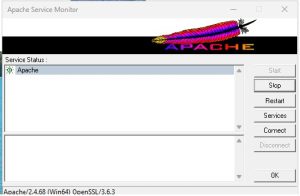
Uninstall Apache service
Open elevated command prompt Go to the Apache\bin httpd.exe -k uninstall -n "Apache2.4"

Allow communication with Domain Controllers by disabling smart multihomed name resolution
gpedit.msc Computer configuration -> Administrative templates ->Network -> DNS Client -> Turn off smart multihomed name resolution

L2TP registry settings
Define VPN connection L2TP PSK Update registry HKLM/System/CurrentControlSet/Services/PolicyAgent/AssumeUDPEncapsulationContextOnSendRule 32-bit, value x02 This one might not be necessary HKLM/System/CurrentControlSet/Services/RasMan/ProhibitIpSec 32-bit , value 0 Restart computer https://windowsreport.com/windows-10-connect-l2tp-vpn-reg/
Time service on Windows Server
In administrator mode: w32tm /unregister net stop w32time w32tm /register net start w32time w32tm /config /manualpeerlist:129.6.15.28,192.168.0.31 /syncfromflags:manual /reliable:yes /update net stop w32time net start w32time w32tm /query /source w32tm /query /configuration